SEC536: Adversarial AI - Penetration Testing AI Systems
SEC536Offensive Operations, Artificial Intelligence

Experience SANS training through course previews.
Learn MoreLet us help.
Contact usBecome a member for instant access to our free resources.
Sign UpWe're here to help.
Contact UsInstall SIFT Workstation and REMnux distros on a single system to create a forensics and malware analysis super-toolkit.

Having the right tools at your fingertips can save hours and even days when examining digital evidence or analyzing malicious artifacts. You can now install two popular Linux distros, SIFT Workstation and REMnux, on the same system to create a powerful toolkit for computer forensics and malware analysis. To quote @ma77bennett, this combo is reminiscent of "Transformers combining together to form a super robot."
You can start with SIFT and then add REMnux, or begin with REMnux and add SIFT to it. As a reminder, the default logon credentials for SIFT Workstation are "sansforensics/forensics". For REMnux they are "remnux/malware".
If most of your work involves digital forensics and incident response tasks for which SIFT Workstation is designed, you'll probably want to start with SIFT Workstation and add REMnux to it. The following approach will let you retain the standard SIFT Workstation look-and-feel, while giving you access to the REMnux malware analysis tools described in the REMnux tool listing.
Begin with a version of SIFT running on Ubuntu 24.04. You can download SIFT as a pre-built virtual appliance or use Cast to install SIFT from scratch.
To add REMnux to your SIFT Workstation, boot into your SIFT system and make sure that it has internet access.
Before proceeding, make sure your system doesn't have an active Ubuntu unattended upgrade in progress. One way to do this is check whether the "unattended-upgrade" process is active (ps aux | grep unattended-upgrade.) If the upgrade is active, let it finish, then reboot the system before installing REMnux.
Then, follow the steps on the REMnux documentation site to add REMnux to the existing system. This will involve a few simple steps to download the REMnux installer and run it in the "addon" mode. To achieve this, you'll download the REMnux installer and run it using the command:
sudo remnux install --mode=addon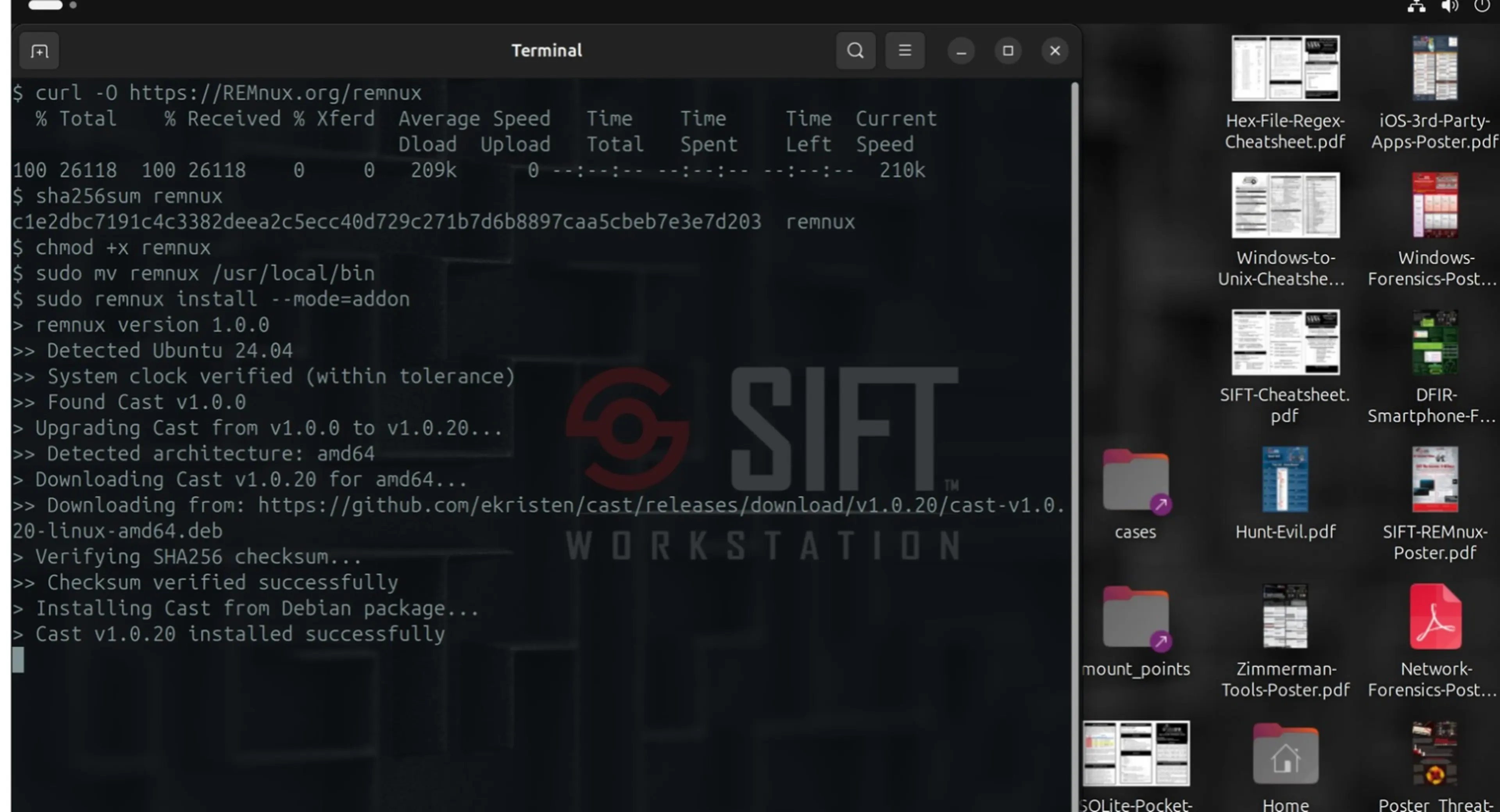
If most of your work involves malware analysis, you'll probably prefer to start with a REMnux system, then add SIFT Workstation. The following steps will allow you to keep the REMnux look-and-feel while benefiting from the forensics tools that come with SIFT Workstation.
Follow installation instructions to set up your REMnux system, starting with a pre-built REMnux virtual appliance or using the REMnux installer to install REMnux from scratch.
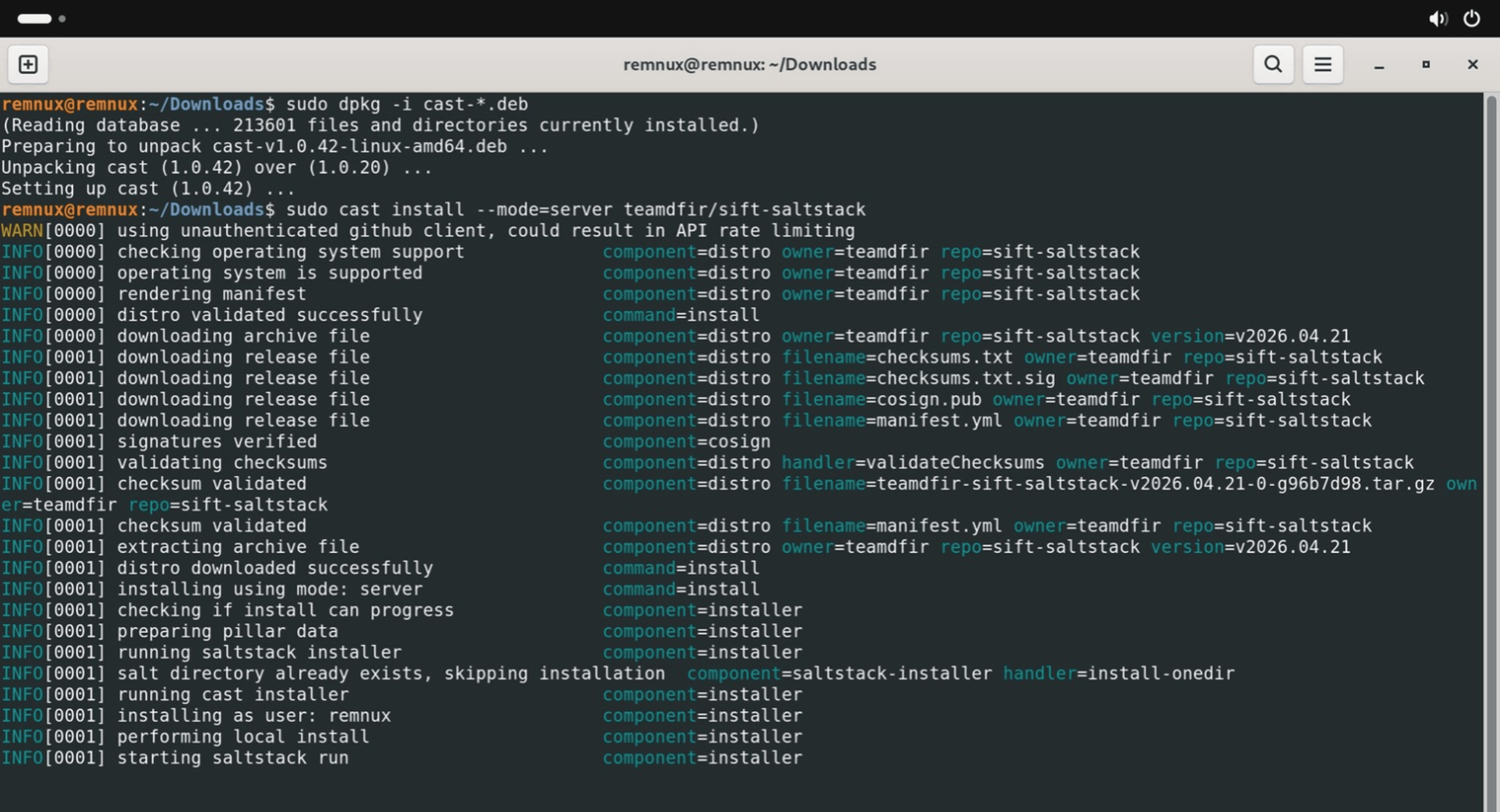
To add SIFT Workstation to your REMnux system, boot into your REMnux system and make sure that it has internet access. Then, follow the steps on the SIFT documentation site to install SIFT using Cast in “server” mode. REMnux includes an older version of Cast, so you’ll update it first. Download the latest Cast .deb package for your system from the Cast releases page. Then, install that package and SIFT using these commands:
sudo dpkg -i cast-*.deb
sudo cast install --mode=server teamdfir/sift-saltstack
The SIFT installer might report failed states for a few tools that REMnux already includes, such as radare2 and ExifTool. You can ignore those messages, because the REMnux versions of these tools remain installed. After the SIFT installer finishes, reboot your system.
To keep your system up to date with the upgraded and newly-added software, periodically run the following commands for SIFT and REMnux:
remnux upgrade
sudo cast install --mode=server teamdfir/sift-saltstack
If you added SIFT to REMnux, always include --mode=server in the SIFT command. Without it, Cast applies SIFT’s desktop settings to your REMnux system, including SIFT’s hostname, wallpaper, and dock layout. If you started with SIFT Workstation and added REMnux to it, use --mode=desktop instead.
Before you update SIFT, install the latest Cast .deb package from the Cast releases page. That way, Cast installs the current stable release of SIFT.
The SIFT installer might report failed states for tools that REMnux already includes, such as radare2. You can ignore those messages, because the REMnux versions of these tools remain installed.
There you have it, two powerful security distros combined in one forensics and malware analysis super-toolkit!
Lenny Zeltser is a cybersecurity executive with technical roots, product management experience, and a business mindset. A SANS Fellow and REMnux creator, he has built security products and programs from early stage to enterprise scale.
Read more about Lenny Zeltser