SEC536: Adversarial AI - Penetration Testing AI Systems
SEC536Offensive Operations, Artificial Intelligence

Experience SANS training through course previews.
Learn MoreLet us help.
Contact usBecome a member for instant access to our free resources.
Sign UpWe're here to help.
Contact Us
In the April 2026 edition of the SANS Stay Ahead of Ransomware livestream, SANS instructors and authors Ryan Chapman and Mari DeGrazia delivered an in-depth technical discussion on two increasingly common initial access vectors: ClickFix and Microsoft Teams-based social engineering attacks.
Historically, the big three initial access vectors were phishing, remote access, and software vulnerabilities. However, in the last year, we have seen two techniques that ransomware-adjacent actors have started leveraging more: ClickFix and Microsoft Teams-based attacks. Their effectiveness and increasing use by ransomware operators make them critical threats to understand and defend against.
In the discussion, Mari covered how ClickFix works, as well as how to detect and prevent the threat. ClickFix emerged around 2024 and saw a 517% increase in 2025. This social engineering technique exploits user trust and unfamiliarity with Windows system functions to execute malicious commands. Unfortunately, the technique proves quite successful, including against organizations with strong user awareness training.
While we focused on Windows during this discussion, there are also variations out there that target Mac and Linux systems as well. Below is a diagram of a typical ClickFix attack flow in a Windows environment.
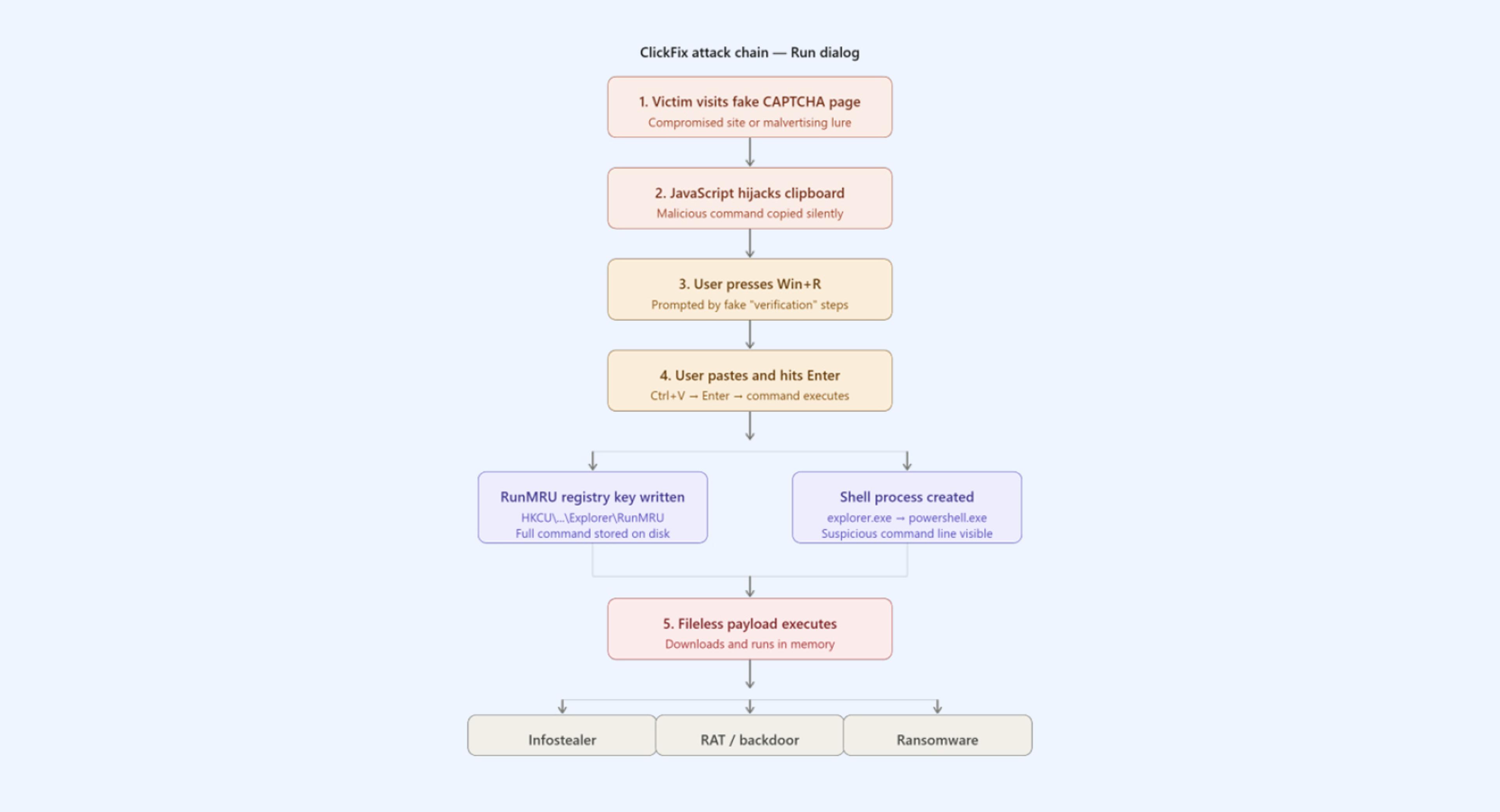
There are several artifacts an examiner can check to locate indications of this attack. Mari walks through each of these in the video and demonstrates some tools that you can use to parse them. This includes the RunMRU key in the registry, the Master File Table, PowerShell event logs, and Internet History. She also shared some Sigma rules that can be applied for detection and monitoring.
Ryan dived into social engineering attacks based in Microsoft Teams. This technique gained prominence through the Black Basta ransomware group in 2024 and combines multiple social engineering elements:
Ryan showed various resources on how organizations can prevent this type of attack, mentioning that the primary defense is to disable external access to Teams unless absolutely necessary. If external communication is required, organizations can use an allow list approach where only trusted partner domains are allowed.
For both ClickFix and MS Teams attacks, training users is paramount.
To learn more about ClickFix and Microsoft Teams-based attacks, we recommend you watch the April 7, 2026 episode of the SANS Stay Ahead of Ransomware livestream. Ryan also created two cheat sheets filled with links, tips, and tricks for addressing both ClickFix and MS Teams-based initial access threats:
Join us on the first Tuesday of each month at 1:00 PM Eastern for the SANS Stay Ahead of Ransomware livestream. You can also review the SANS Stay Ahead of Ransomware livestream playlist on YouTube.
Remember to check out our upcoming SANS training events, including FOR528: Ransomware and Cyber Extortion, where we dive into the technical details of preventing, detecting, and responding to ransomware and cyber extortion attacks. On the AI side of things, we also have FOR563: Applied AI for Digital Forensics and Incident Response: Leveraging Local Large Language Models, which teaches cyber defenders to leverage AI to aid in DFIR and IR investigations.
Mari DeGrazia loves the satisfaction of solving a good puzzle. That fascination paired with her technical abilities has made digital forensics the perfect career fit. She has 20 years of experience in the IT industry, including 10 years in DFIR.
Read more about Mari DeGrazia